How to Show Volleyball Scores on the Venue Screen at a Tournament
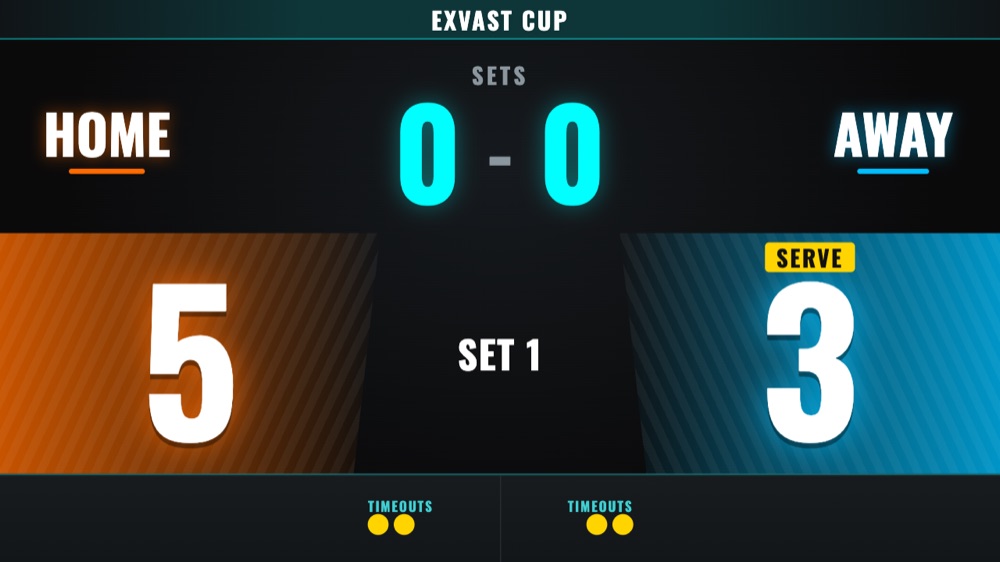
With EXVAST-VISION, an iPhone or iPad connected to the venue screen shows the score, sets, serve and time-outs for volleyball, beach volleyball and sitting volleyball. You only tap the team that won the rally; sets, serve and court changes are counted for you.
In this guide
What you need
- An iPhone or iPad with iOS / iPadOS 16 or later
- EXVAST-VISION from the App Store (free version available)
- A TV, monitor or projector at the venue
- A USB-C to HDMI adapter, or a screen that supports AirPlay
Step 1. Choose volleyball and the format
Choose Volleyball, Beach Volleyball or Sitting Volleyball, then tap ⚙ to pick the format.
| Format | How it is played |
|---|---|
| FIVB | Best of 5 sets, 25 points (final set 15) |
| 3 sets (21 points) | Best of 3 sets, 21 points |
| 3 sets (25 points) | Best of 3 sets, 25 points |
| 9-a-side | 3 sets of 21 points, with a second serve |
| Beach Volleyball | Best of 3 sets, 21 points (final set 15) |
Step 2. Connect to the screen
| Connection | What to do |
|---|---|
| Cable (HDMI) | Plug a USB-C to HDMI adapter into your iPhone or iPad and connect it to the TV. |
| Cable (USB-C) | If the screen accepts video over USB-C, one USB-C cable is enough. |
| AirPlay | Open Control Center, tap Screen Mirroring and choose the TV. |
Once connected, the TV shows the scoreboard and your device shows the remote. The TV does not simply mirror your phone.
Step 3. Tap the team that won the rally
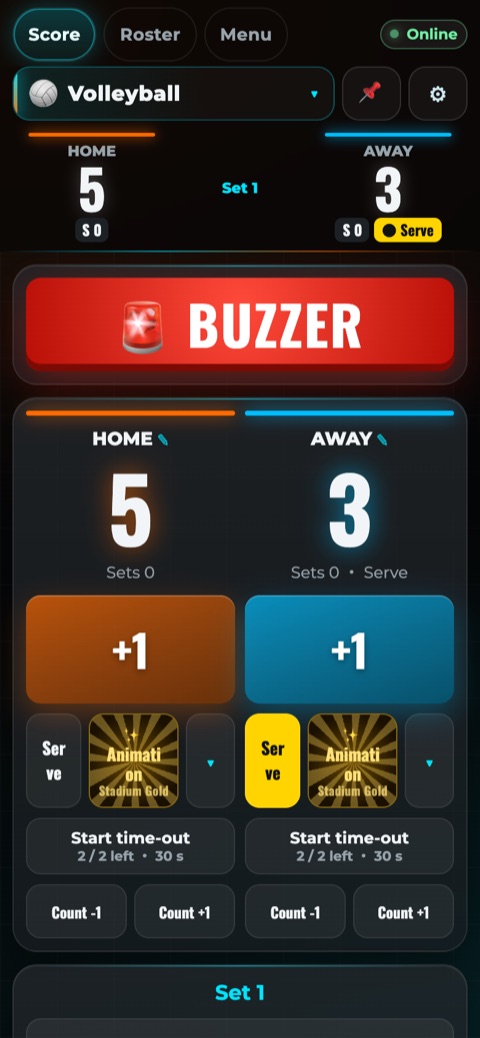
- Tap +1 for the team that won the rally. The serve moves to that team, and sets are counted for you.
- "Serve" switches the serving team by hand if you need to.
- "↩ Undo" takes back the last tap.
- The remote tells you when it is time to change courts: in the final set at 8 points indoors, and in beach volleyball every 7 points (every 5 in the third set).
- "Start time-out" shows the 30-second countdown (two per set).
- The break timer shows the break between sets.
Step 4. Team names, sound and celebrations
- Add team names, colors and logos from the Menu.
- "🚨 BUZZER" sounds an arena-style buzzer through the screen's speakers.
- Turn on "✨ Auto animation on score" to light up the scoreboard on every point.
Good to know
- Keep the app open during the game. If you switch to another app or lock the device, the scoreboard stops too. While the app is open, the device will not go to sleep.
- The free version shows a small watermark on the scoreboard and ads in the remote. The paid version removes them and adds saved logos, rosters and lineups, extra remotes and Share online.
- With Share online (paid), anyone who scans the QR code can watch the scoreboard on their phone, wherever they are. They can watch but not control it, and only need a web browser.
- Only the iPhone or iPad connected to the screen needs the app. Other devices open a QR code in their web browser, so Android phones, Windows PCs and Chromebooks work too, with nothing to install. Showing the scoreboard on another screen is free; using them as extra remotes is paid. They must be on the same Wi-Fi.
- Each court needs its own iPhone or iPad and its own screen.
Questions and answers
- Does it count sets automatically?
- Yes. When a set ends, it moves to the next set and adds it to the set score.
- Does it handle beach volleyball court changes?
- Yes. The remote signals a court change every 7 points, and every 5 points in the third set.
- Can spectators outside the venue follow the score?
- With Share online (paid), anyone who scans the QR code can watch the scoreboard on their phone.
- Can I use an Android phone, a Windows PC or a Chromebook?
- Yes, as an extra remote (paid) or to show the scoreboard (free): they open a QR code in the web browser, with nothing to install, on the same Wi-Fi. The device connected to the screen must be an iPhone or iPad with the app.
- Is it free?
- There is a free version with a watermark and ads. Paid plans start at $2.99 a month for one sport on the US App Store.
Put the score on the big screen
EXVAST-VISION is free to download. See the User Guide for every feature.