How to Add a Soccer Scoreboard Overlay to OBS
Want to put a broadcast-grade scoreboard (score, match clock, stoppage time, penalty shootouts) on your soccer live stream? With EXVAST-GFX, you can control the score with simple buttons while feeding a transparent graphics overlay into OBS via a Browser Source. It also supports small-sided youth soccer (5 to 11 players), futsal (countdown timer & team fouls), and beach soccer. No programming required.
- What you need
- Step 1. Open Football in EXVAST-GFX
- Step 2. Set up your teams & game rules
- Step 3. Turn ON EX-LINK & copy the URL
- Step 4. Add the Browser Source in OBS
- Step 5. Show the scoreboard & run the match
- Step 6. Auto-sync with gym scoreboards in Futsal (Scoreboard Reader · PRO)
- What else you can do with the PRO plan
- If the scoreboard doesn't appear
What you need
- Windows 10 / 11 (64-bit) or Mac (Apple Silicon M1 or later, macOS 14 Sonoma or later)
- OBS Studio (on the same machine or another computer on the same network)
- EXVAST-GFX (download free). The soccer scoreboard and EX-LINK are available in all plans, including LITE.
Step 1. Open Football in EXVAST-GFX
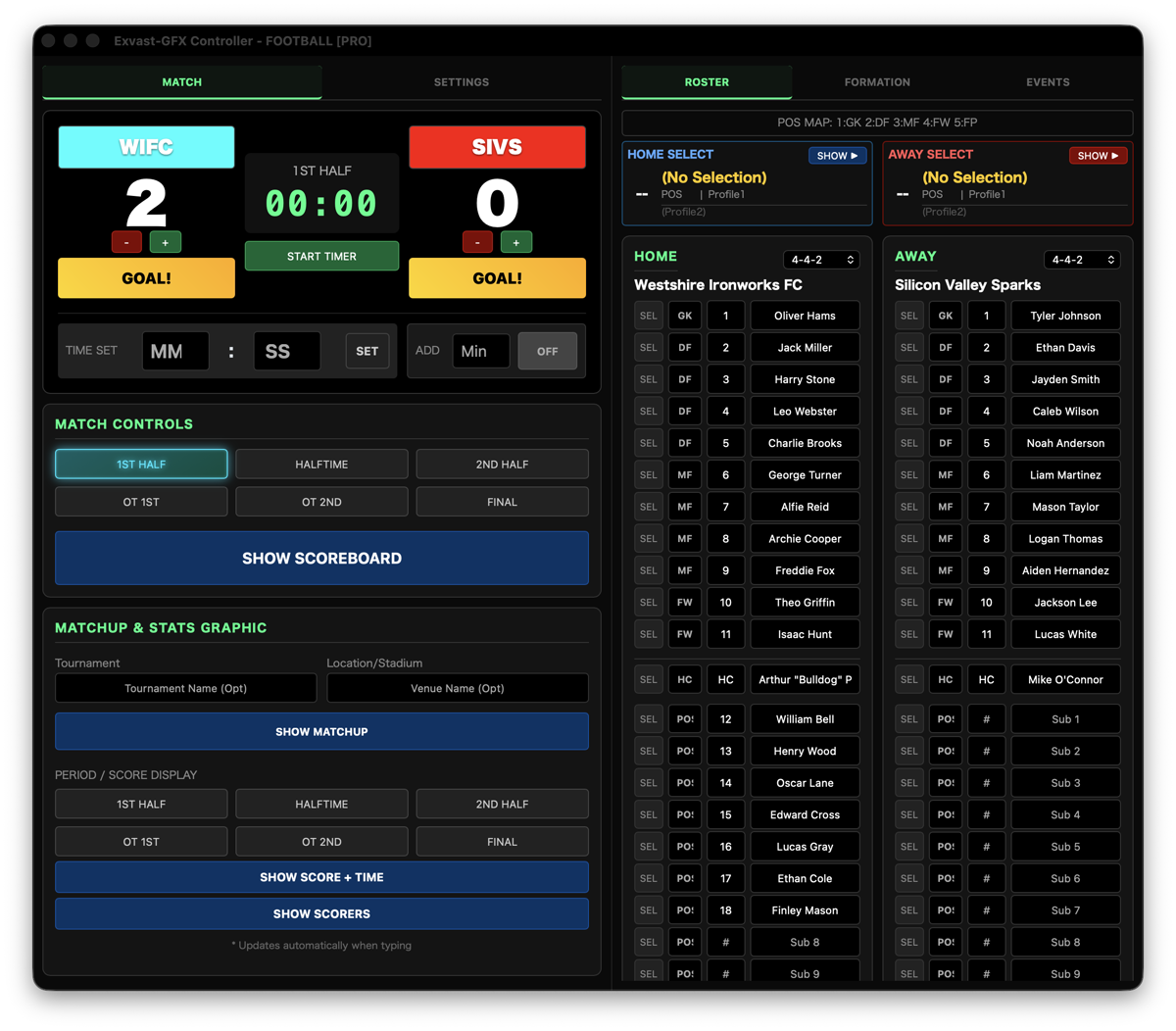
Launch EXVAST-GFX and click Football on the launcher. Three windows will open: the Controller (for scoring), the Output Manager (streaming/recording outputs), and the Receiver (live graphics window).
Step 2. Set up your teams & game rules
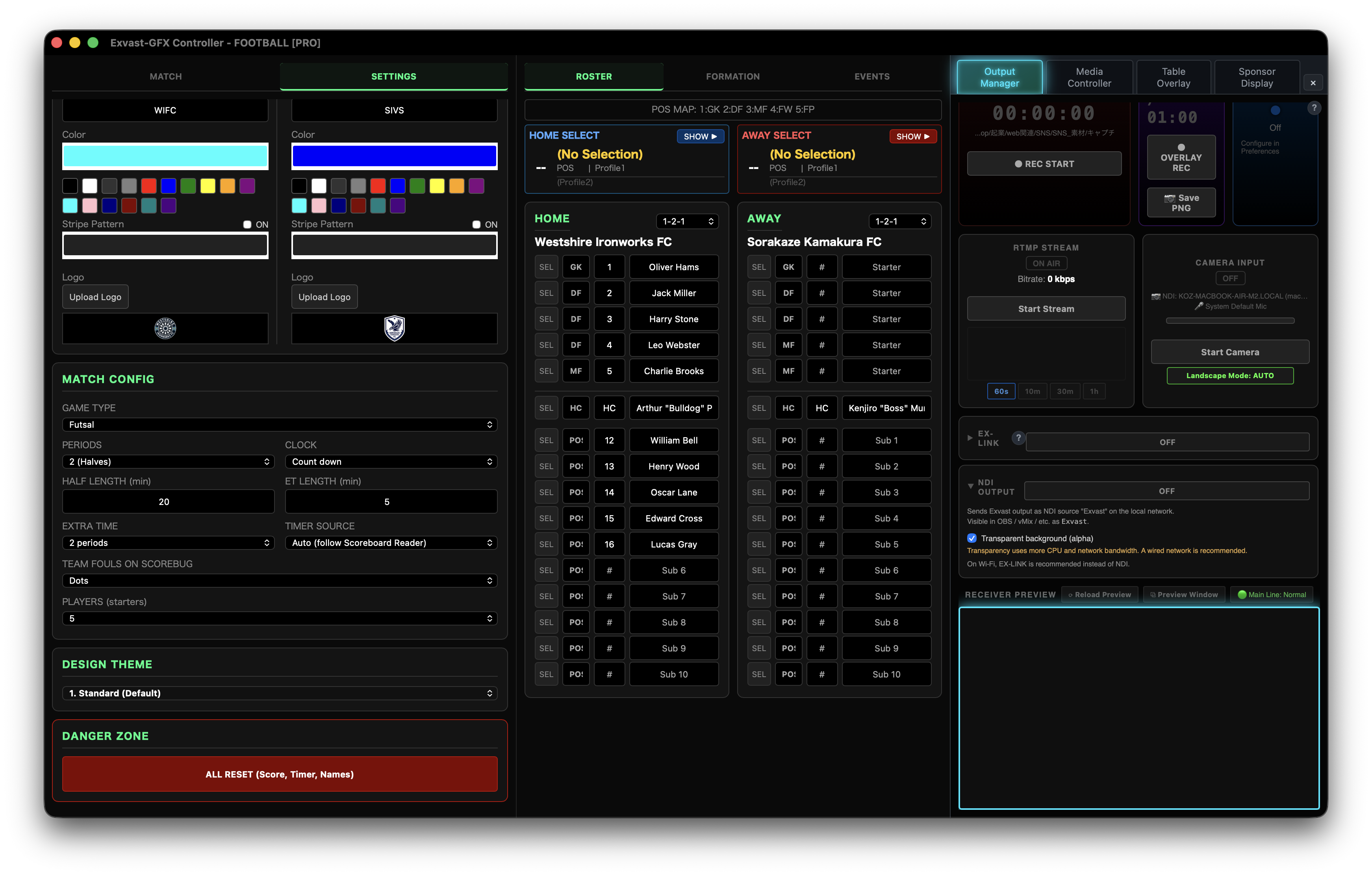
Click the SETTINGS tab in the Controller to configure your match before kickoff:
- TEAM SETTINGS: Set team names, short abbreviations, team colors, and upload logos for Home and Away.
- GAME TYPE: Choose between Football (45-min halves, count-up clock), Futsal (20-min halves, countdown clock stopping at 0:00, team fouls), or Beach Soccer (12-min x 3 periods).
- PLAYERS: Set team squad size (5 to 11 players). Starters, formation presets, and lineup graphics automatically adjust.
- HALF LENGTH: You can customize half length to any minute amount (e.g., 20 or 25 minutes for youth matches).
Step 3. Turn ON EX-LINK & copy the URL
In the Output Manager, toggle EX-LINK to ON. A local URL will appear. Click Copy.
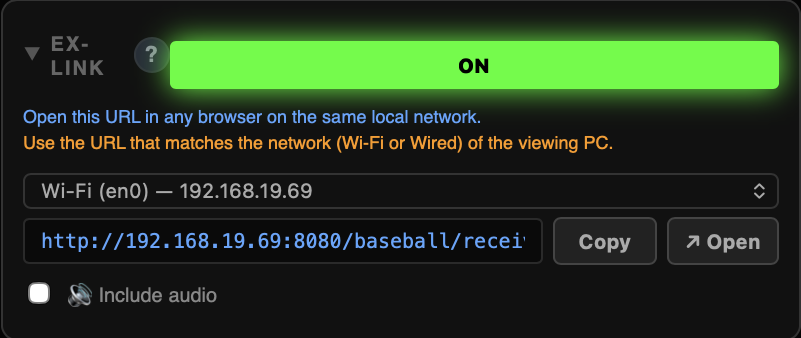
If your computer is connected to both Wi-Fi and Ethernet, select the IP address matching the network your OBS PC is on.
Step 4. Add the Browser Source in OBS
- In OBS, click + under the Sources dock and select Browser.
- Paste the copied URL into the URL field.
- Set Width to 1920 and Height to 1080.
- Position the Browser Source above your video camera capture source in the list.
The scoreboard will float over your match camera with a crystal-clear transparent background.
Step 5. Show the scoreboard & run the match
In the Controller's MATCH tab, click SHOW SCOREBUG to display the scoreboard on screen. During the match:
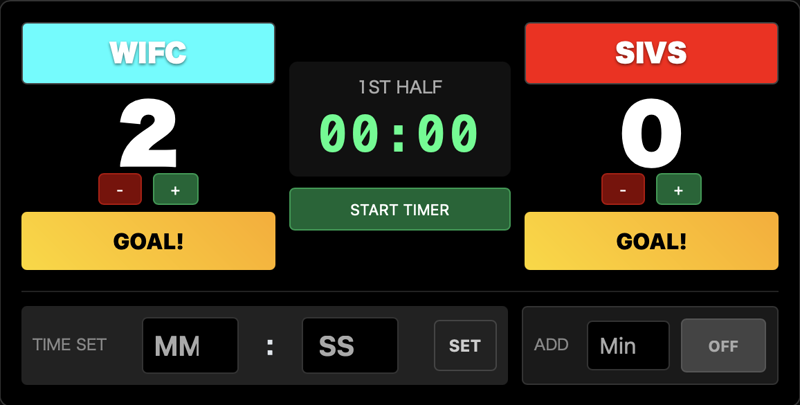
- Click START TIMER to start the match clock; click again to pause. If you need to correct the time, type minutes and seconds into TIME SET and click SET.
- Click GOAL! to add a goal with an explosive on-screen GOAL animation. To correct score without animation, use + / −.
- Enter stoppage time into Add and toggle ON to show the added time badge (e.g., "+3") on the scorebug.
- Use 1st Half / Halftime / 2nd Half / Final to transition periods.
- Click SHOW MATCHUP for full-screen pre-match vs cards, SHOW SCORE + TIME for halftime/fulltime summaries, and SHOW PK GRAPHIC for penalty shootouts.
- In Futsal mode, use FOULS − / + to trigger team foul indicators on the scorebug.
Step 6. Auto-sync with gym scoreboards in Futsal (Scoreboard Reader · PRO)
In sports like futsal played in indoor arenas, the match clock stops every time the ball goes out of play (stop-clock timing). Pausing and unpausing a software clock manually while operating a camera is nearly impossible for solo streamers.
With the PRO plan, Scoreboard Reader (Beta) solves this: point a secondary camera, capture device, or NDI feed at the gym's wall scoreboard, and the countdown clock and scores will sync automatically to your OBS broadcast (also works at soccer stadiums with LED scoreboards).
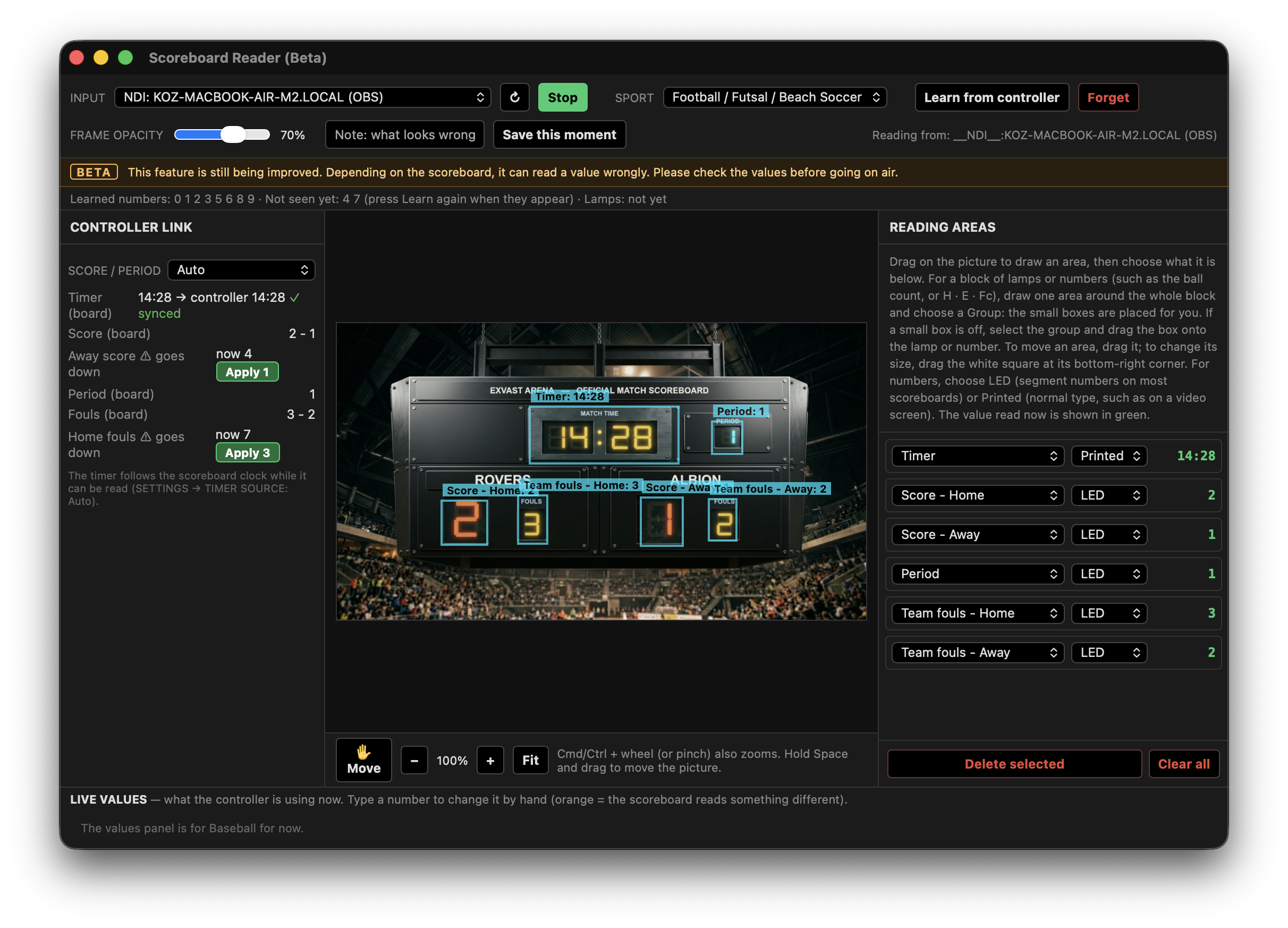
- Open Tools → Scoreboard Reader (Beta) from the menu bar (or press ⌘8 / Ctrl+8).
- Under INPUT, select a webcam, capture card, or NDI feed aimed at the gym scoreboard, and click Start (runs alongside your main match camera).
- Drag boxes over the clock and score digits on the preview, and assign them as Timer, Home score, and Away score in the right panel.
- In the Controller's SETTINGS tab, set TIMER SOURCE to Scoreboard Reader. Your overlay countdown clock now starts and stops in perfect sync with the venue referee clock.
- Score updates can be applied in Auto (instant) or Confirm (click Apply when points change) mode.
What else you can do with the PRO plan
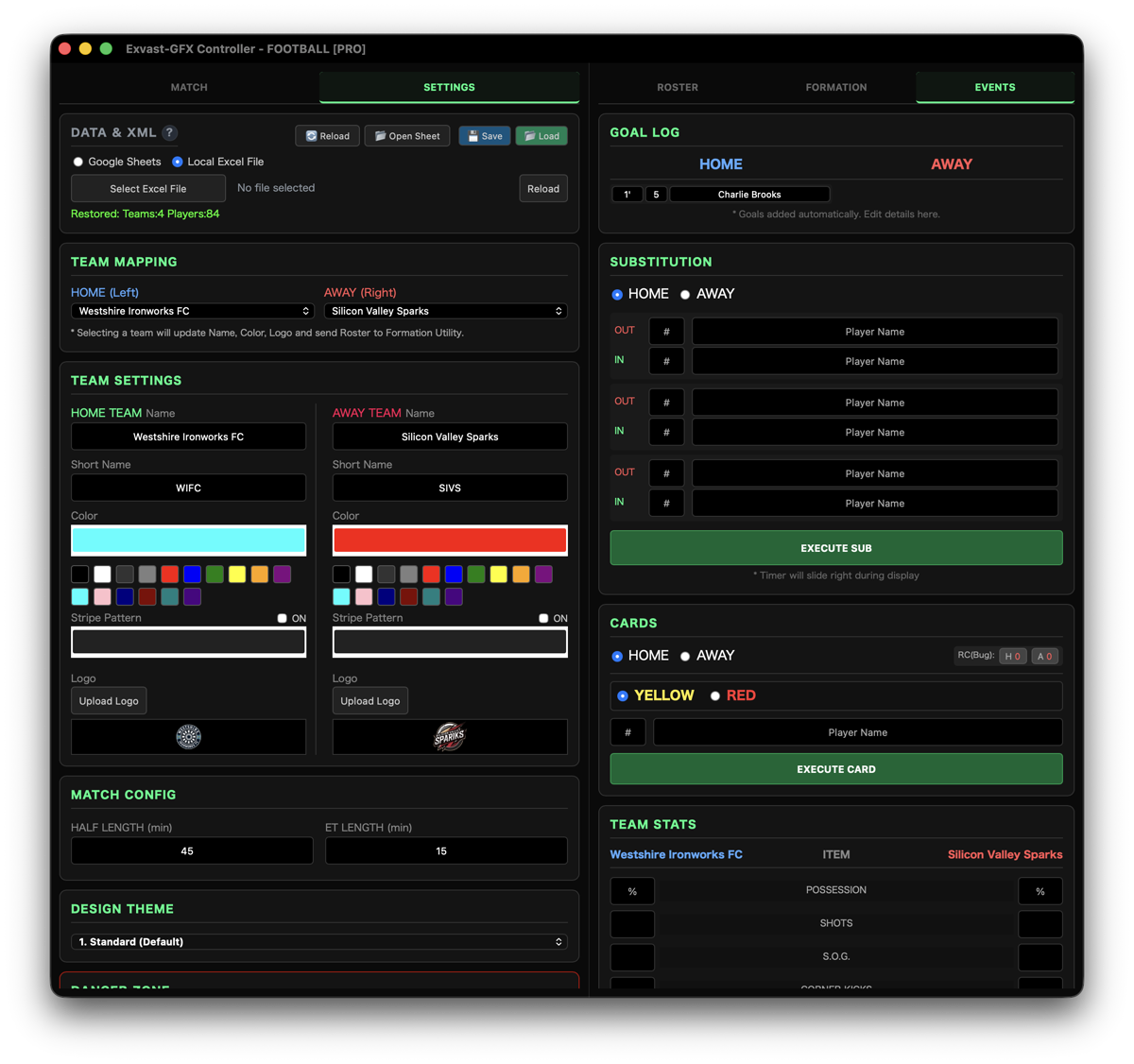
The PRO plan unlocks the right-side control deck (ROSTER / FORMATION / EVENTS):
- Player rosters: entering player names lets GOAL! log goalscorers automatically, with on-screen goalscorer lists.
- Animated starting lineups, pitch formation diagrams, substitution cards, yellow/red cards, and commentator lower-thirds.
- Import team rosters directly from Excel or Google Sheets.
- Output clean alpha channels over NDI® or Blackmagic SDI Fill/Key.
If the scoreboard doesn't appear
- Ensure EX-LINK is toggled ON in Output Manager and SHOW SCOREBUG is clicked in the Controller.
- If OBS is on another computer, connect it to the same Wi-Fi or wired network, and select that specific network URL in Output Manager.
- Verify the Browser Source width and height in OBS are set to exactly 1920 × 1080.
Try it on your next match
Download EXVAST-GFX and try it completely free. You can also add scoreboards to previously recorded match videos (read the guide).
Download free